
Starting a web development project can be exciting, but jumping straight into coding without proper preparation can lead to frustration and wasted effort. To ensure your project runs smoothly and efficiently, here are seven crucial steps you should take before opening your code editor.
Define Your Project Goals
Understanding the purpose and objectives of your project is fundamental. Ask yourself: What problem does your project solve? Who is your target audience? What features are essential for the project? Having clear goals helps you stay focused and make informed decisions throughout the development process.
Plan Your Project Structure
Before writing any code, outline the structure of your project. This includes deciding on a consistent naming convention and directory structure, choosing the appropriate technologies and tools based on your project requirements, and planning how data will be stored, retrieved, and managed. A well-organized project structure saves time and reduces confusion later on.
Gather and Analyze Requirements
Work closely with stakeholders to gather detailed requirements. This includes identifying specific features and functionalities your project must have (functional requirements) and setting performance, security, and usability standards (non-functional requirements). Documenting these requirements ensures everyone is on the same page and helps prevent scope creep.
Create Wireframes and Mockups
Visualizing your project's design through wireframes and mockups provides a blueprint for your development. Tools like Figma, Sketch, or Adobe XD can be used to create these visuals. Focus on how different elements will be arranged on the screen (layout), the look and feel of your application (user interface), and how users will interact with your application (user experience). Wireframes and mockups help identify design issues early and provide a clear reference during development.
Set Up a Version Control System
Version control systems (VCS) like Git are essential for managing code changes and collaborating with other developers. Before you start coding, initialize a Git repository, create a `.gitignore` file to exclude unnecessary files from version control, and establish a branching strategy (e.g., GitFlow) to manage feature development and releases. Using a VCS ensures you can track changes, revert to previous versions, and collaborate effectively.
Prepare Your Development Environment
Setting up your development environment before coding saves time and avoids potential issues. This includes installing necessary software and tools (e.g., code editor, browser, terminal), configuring your code editor with extensions and settings that enhance productivity, and setting up a local development server and database. A well-configured environment streamlines your workflow and reduces the likelihood of encountering technical hurdles.
Outline a Development Plan
A detailed development plan acts as a roadmap for your project. It should include key phases or features that mark progress (milestones), specific actions required to achieve each milestone (tasks), and estimated completion dates for each task and milestone (deadlines). Breaking down your project into manageable tasks makes it easier to track progress and stay on schedule.
Essential Tools for Web Developers
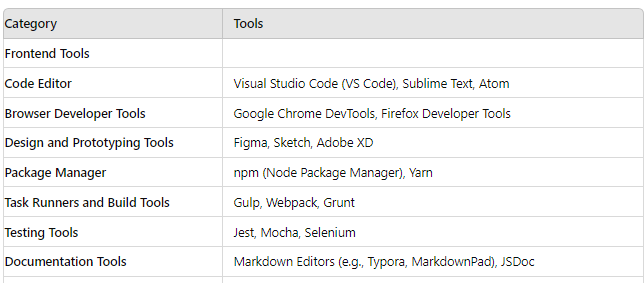
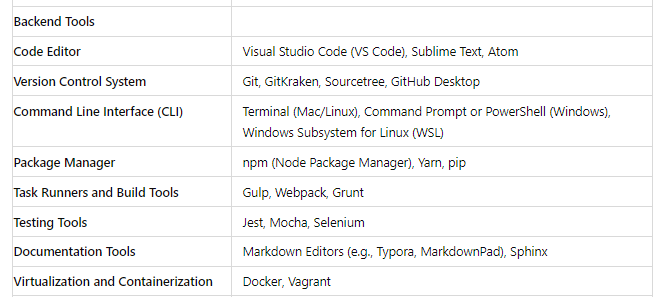
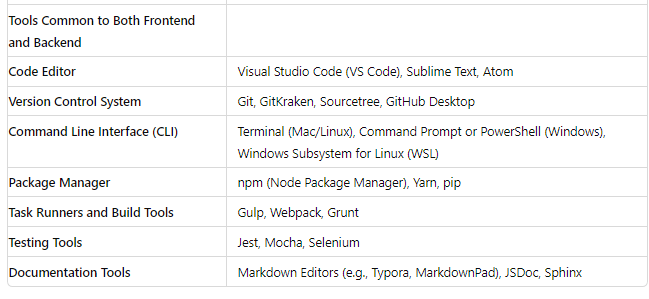
To further aid in your preparation, here are some essential tools categorized into frontend and backend tools, as well as common tools for both.
Frontend Tools
Backend Tools
Fullstack Tools
Conclusion
Having your tools organized and ready is essential for a smooth development process, whether you're building the frontend, backend, or both. By using the right tools and following key preparation steps, you'll create a strong foundation for your project, leading to a more efficient development journey and a higher chance of delivering a successful, high-quality product. So, before diving into code, ensure you've completed these essential steps. Happy coding!
We'll delve deeper into the programming languages and frameworks that make web development productive and enjoyable.

Christopher Frimpong
Sep 24, 2025 • 12:50 AM